Scratch Jr coding lesson 2 - What is Scratch Jr ?
Helping your child start coding? You are in the right place.
Have you ever played with a pile of Legos? Think of how easy it is to just start stacking the bricks to make a castle or a car. You don’t need a manual; you just snap them together.
ScratchJr is exactly the same—it is "Digital Legos."
Your child drags visual blocks together to make characters move, jump, and speak. They learn logic without realizing they are "studying."
Want to see exactly how the blocks fit together?
Most children (ages 5-8) learn faster by watching rather than reading. In my full video course, I walk your child through every single step of this project.
They can follow along on their tablet while I teach them—giving you a break.
What is ScratchJr?
In this lesson, we are going to learn about ScratchJr, a simple visual programming language designed specifically for young children (ages 5-7). It allows kids to talk to computers and give them instructions by snapping together graphical blocks.
How do I install ScratchJr on a tablet?
Before we can build, we need the app. ScratchJr is a free app available for iPad and Android tablets. (Note: It works best on tablets, not phones).
Watch this 1-minute setup guide to check if your device is ready:
Check your tablet now: If you see the Cat Icon, you are ready to go!
The ScratchJr Interface: A Quick Tour
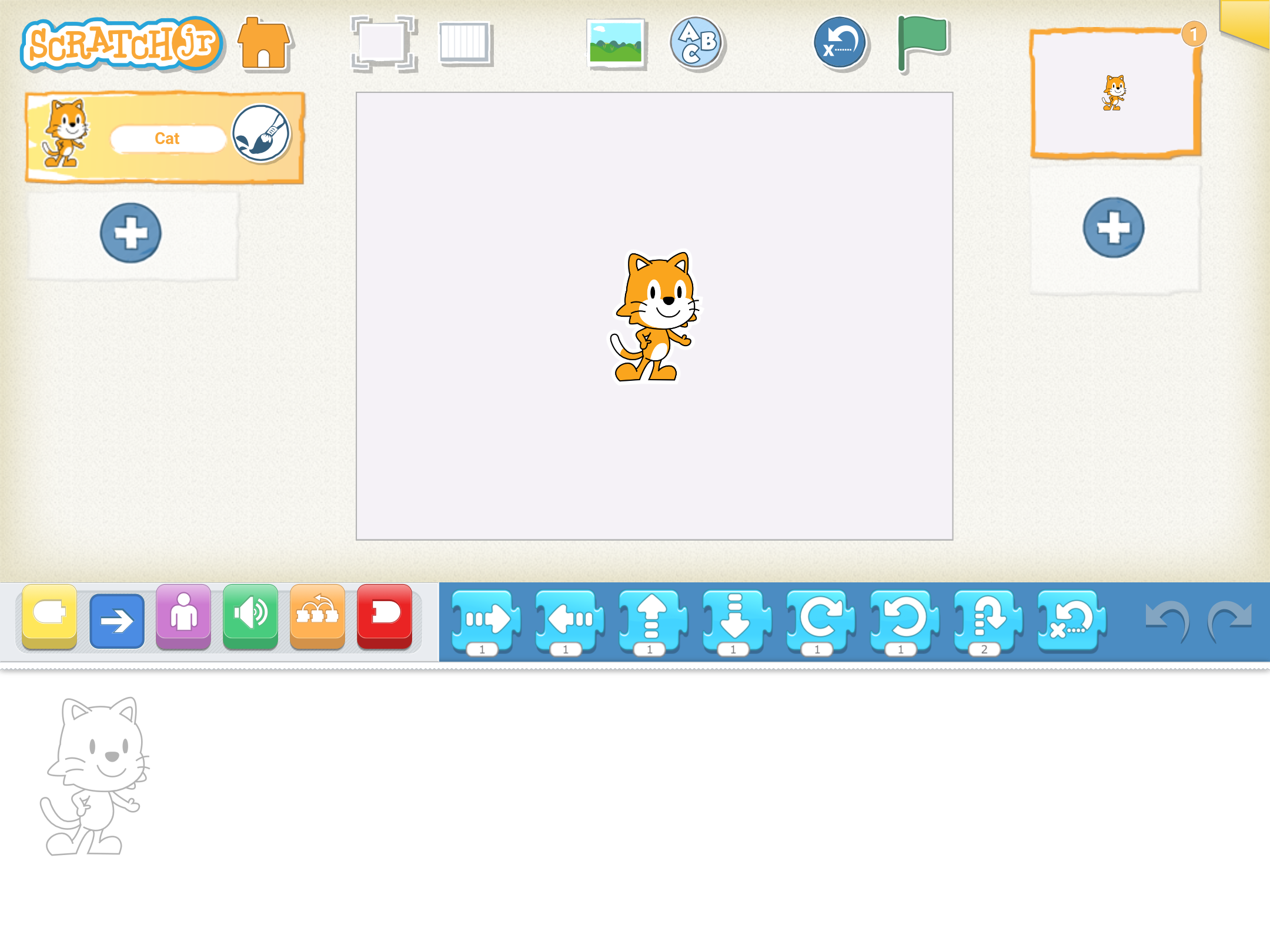
When you open the app, you will see the "Studio." Here is the map:
- Left Side: Your Characters (Sprites). This is who is in your story.
- Middle: The Stage. This is where the action happens.
- Top: Backgrounds. Change the scene from a bedroom to the moon.
- Bottom: The Coding Area. This is where you snap the blocks together.
🚀 Today's Challenge
Your Goal: Install the ScratchJr app on your tablet and open it to the "Home" screen.
Is your child asking questions you can't answer?
If you want your child to move beyond just "installing the app" and actually build their first game today, grab the full course. It includes 15 step-by-step video lessons designed for kids to watch on their own.
Start the Full Curriculum →Frequently Asked Questions about ScratchJr
Is ScratchJr free to use?
Yes, the ScratchJr app is completely free and developed by researchers at Tufts University and MIT. There are no ads in the app.
What is the difference between Scratch and ScratchJr?
ScratchJr is designed for ages 5-8 and requires no reading skills. Scratch is more advanced, text-based, and better suited for children ages 9+.
Does my child need to know how to read?
No. ScratchJr uses symbols and colors, so children who cannot read yet can still learn logic and coding concepts.
When you draw a picture on the paper it does not move. When you write a story on paper, it does not make sound.
ScratchJr lets you create games, draw characters, record sounds, and create interactive stories. You can take an idea in your head and make it come to life with ScratchJR. When you are in a new project in ScratchJr, you can see a variety of things on the screen.
The ScratchJr Interface: A Quick Tour
When you open the app, you will see the "Studio." Here is the map:
- Left Side: Your Characters (Sprites). This is who is in your story.
- Middle: The Stage. This is where the action happens.
- Top: Backgrounds. Change the scene from a bedroom to the moon.
- Bottom: The Coding Area. This is where you snap the blocks together.
The challenge for this lesson is to install the free ScratchJr app on your tablet device. If you are not sure if you have the right device, watch this video Scratch Jr App
After you install the app, test it out by clicking on the cat icon to make sure the app opens on your device.